Each court message in your mailbox
The message text, a PDF copy and the original attachments go to your mailbox with a dedicated label.
Alexys · Designed by lawyers, for lawyers
Alexys is a very sophisticated legal assistant, as dedicated as an excellent associate. It reads your court correspondence, tracks your deadlines and prepares the routine work: client replies, draft pleadings, bundles. You ask by message or voice. You review and approve.
3.41× faster on routine work · Hosted in the EU · Reference call on request
What came in from the court overnight?
Reply to Mr Smith's last three emails on his lease
Add Northgate's comments to the witness statement
Results · An established Paris litigation firm
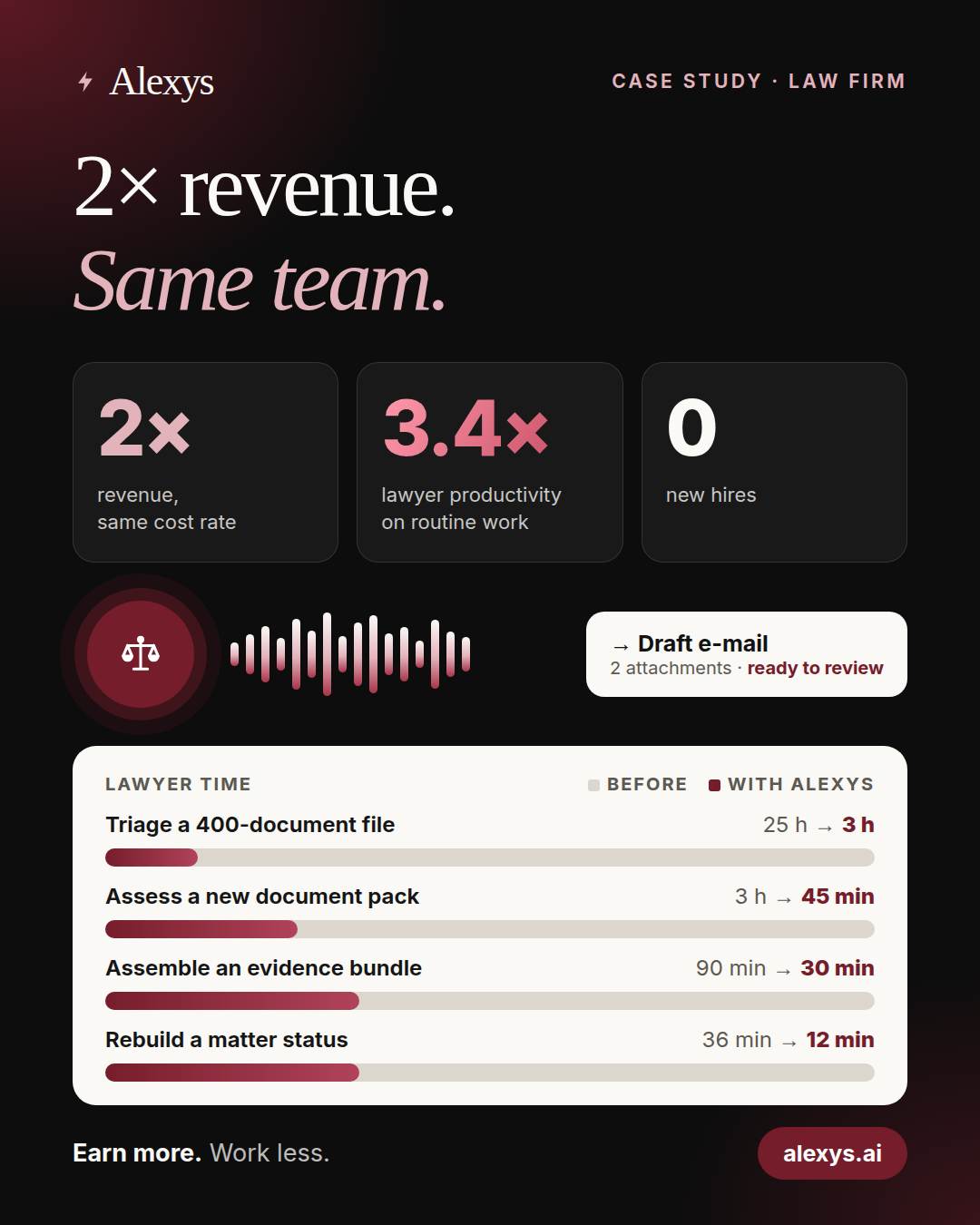
Estimate per task, lawyer review included. Revenue reported by the firm.
Court correspondence
At the reference firm in Paris, Alexys reads the court messages on the secure network for French lawyers (RPVA). It puts each message in the firm's mailbox and makes a list of the work to do. A new event that needs a client update: 30 minutes to find, read and draft by hand, 10 minutes with Alexys to check, correct and approve. For UK and UAE firms, we agree the court sources and access before the fixed quote.
Updated after the last court-message read
The message text, a PDF copy and the original attachments go to your mailbox with a dedicated label.
Each time it reads the messages, Alexys makes a task list for each matter and each procedure. It shows the deadlines, hearings, adjournments and checks, with a priority and the date of the source message.
After an adjournment or a court notice, the draft email to the client is ready in Gmail, with the correct attachment. You read it and send it.
Alexys reads the hearing date in the claim form. It sends a reminder each morning until the process server confirms service.
The lawyer logs in personally, with the access key, PIN and second factor. Alexys never receives these credentials. It reads messages. Filing and sending to the court stay with the lawyer.
UK and UAE court systems are different. Before the fixed quote, we confirm the sources for your practice. Official guidance: MyHMCTS, HMCTS E-Filing (CE-File), DIFC Courts and ADGM Courts.
Message or voice
Send an instruction by message or voice, as you do to an assistant: “Prepare a reply”, “Find the engagement letter” or “Where are we on this matter?” Alexys finds the thread, the documents and the matter. Then it prepares the work in Gmail, Outlook or Word. You do not search through emails and folders.
Tell Mr Smith the hearing moved to the 14th, and attach the court's notice.
Draft in Mr Smith's thread · 1 attachment
Where are we on the Northgate Retail claim?
Status note · 2 open points
Prepare the bundle index for tomorrow and tell me what is missing.
Index ready · 3 documents missing
Your new associate
Alexys is a very sophisticated assistant. It works like a very dedicated associate: it reads the full file, prepares the work at any hour and tells you what is missing. Like any associate, it can sometimes make a mistake. That is why you review and approve each result, and that is how it improves.
It knows your daily work: deadlines, pleadings, bundles, engagement letters. It reads all the threads and documents before it prepares anything.
It prepares what you ask for, at any hour, by message or voice, and keeps your deadline list up to date.
It can make mistakes. When it is not sure, it asks you. When a document is missing, it tells you. It never fills a gap with a guess.
Each correction improves how it works for your firm: your wording, your templates, your priorities. The more you use it, the less you correct.
Your feedback improves its working rules. It never trains an AI model on your matter data.
What Alexys prepares for you
Client replies, draft pleadings, bundles and engagement letters. Each task gives a draft email or a Word document that a lawyer reviews.
Client correspondence
The client asked several questions in several emails. Alexys reads the full thread and prepares one reply in the correct thread.
The draft stays unsent. The lawyer edits it and approves it.
Draft reply ready for review
Pleadings
Alexys writes the draft from the documents and correspondence of the matter. It gives the draft as a Word document.
The lawyer decides the strategy and the argument, then corrects and signs.
Word draft ready for review
Revisions
The client comments on a statement of case or a witness statement. Alexys adds the relevant comments to the Word document as tracked changes.
The lawyer accepts or rejects each change.
Revision ready for review
Bundles
The lawyer asks for the certificate of service. The only attachment found is an invoice. Alexys does not attach the invoice. It flags the missing certificate and drafts a request for it.
The lawyer decides how to get the missing document.
Missing document flagged
Engagement documents
Alexys finds the client's signed engagement letter and attaches the original file with no change. A digital fingerprint confirms that it is the same file.
The lawyer confirms the document. Alexys does not state that a document is signed unless it checked the signature.
Draft with the original attached
Billing
Alexys prepares the paid invoice only when the signed fee agreement, the bank payment and the records agree. If they do not agree, it flags the difference.
The lawyer checks and issues the invoice.
Invoice ready for review
How it works
Email, court messages, deadlines, pleadings, documents, billing: Alexys does the repetitive work of the whole firm. We test each task on your matters before go-live, and it improves with each correction.
Email, court messages, deadlines, pleadings, documents, engagement letters and billing. We find what takes your time.
Your mailbox, court correspondence and document storage, under the data processing agreement that we sign before connection.
We check each task on your past matters before go-live.
By message or voice. You review, approve and send.
Each correction improves how it works for your firm.
Controls
These controls are part of each task. We test them before go-live.
Alexys prepares factual summaries, drafts and documents. The lawyer decides the advice, the legal position and the next action.
Alexys makes drafts. The code blocks sends to clients, other parties and courts. An instruction alone does not do this. We test the block before go-live.
If the client or the matter is not clear, Alexys asks. It does not guess.
Alexys lists what it did not find and flags conflicting dates. It does not replace a document with a similar file.
Your data and client confidentiality
Client confidentiality is not optional. Alexys uses the professional guidance on AI for lawyers, with human review of each result.
The servers and the documents of your firm are hosted in the EU. Administration access uses an encrypted private network.
Before we connect your sources, we sign a data processing agreement with your firm. It fits UK GDPR, the UAE data protection law, or the DIFC or ADGM rules, as they apply to your firm. It sets the data, the users, the sub-processors, the processing locations and the retention period.
You get a written list of the AI models, email, storage and messaging services, with their locations and any transfer. You accept it before we connect your sources.
Alexys records each action. Each sensitive action waits for a recorded approval. You know who asked for what, and when.
Signed documents are kept byte for byte, with a digital fingerprint. Your matter data is never copied into the software code.
At the end of the engagement, we return your data and delete it from our servers, within the period in the agreement.
Case study
The change that made the difference: client emails, their attachments and court correspondence in one complete matter view. The managing partner checks the sources, corrects and approves. The work does not start from a blank page.
3.41× productivity and 2× revenue, without hiring. Revolead.ai brought in the clients. The workflow gave the firm the capacity to serve them. The case study shows the calculation, daily use and lawyer controls.
Talk to the managing partner. The managing partner is ready to tell you about the results.
Yes, like any associate. That is why nothing leaves without your approval, and why it flags its doubts and gaps instead of guessing. Each correction helps. It learns your methods and makes fewer mistakes on the tasks it does often.
No. The lawyer logs in personally. Alexys never receives the access key, PIN or second factor. It reads the messages that the firm receives. It does not file or send anything to the court.
Use the UK page for solicitor workflows, with court examples from England and Wales. Use the UAE page for document collection, client updates and preparation for mainland, DIFC or ADGM matters.
The scope to automate, the access it needs, representative examples, acceptance cases and one all-inclusive fixed quote. Up to two change requests within the agreed need are included.
Each task that goes live passes the acceptance cases that we define before work starts. If it does not, we correct it at no additional fee. Reproducible defects in the accepted scope stay covered for 14 days after go-live.
No. You keep what we build. Or we run it for you. We host, monitor and update it, and we make small changes. We agree the run plan and its price before it starts. You can stop the plan at any time.
See how much time Alexys can give back to your firm
Contact: [email protected]
Describe the task with fictional examples. Do not send confidential client documents by email.