At last, more time for your clients—and room to grow your firm. Client emails, attachments and court notices, read together in one matter view. Ask by text or voice. Get the reply, the matter update or the bundle ready to approve.
Send an instruction by message or voice, as you do to an assistant: “Prepare a reply”, “Find the engagement letter” or “Where are we on this matter?” Alexys finds the thread, the documents and the matter. Then it prepares the work in Gmail, Outlook or Word. You do not search through emails and folders.
Say what you needType a message or send a voice note. Use your own words.
The correct matter, or a questionAlexys finds the client, the matter and the relevant documents. If the matter is not clear, it asks you to confirm.
Nothing leaves without youAlexys makes drafts. The code blocks external sends until a lawyer approves.
0:12
Tell Mr Smith the hearing moved to the 14th, and attach the court's notice.
→Draft in Mr Smith's thread · 1 attachment
0:07
Where are we on the Northgate Retail claim?
→Status note · 2 open points
0:16
Prepare the bundle index for tomorrow and tell me what is missing.
→Index ready · 3 documents missing
Workflows for UAE solicitors and law firms
Less document chasing. More time for the matter.
Choose one repeated task. We build it around the sources and checklist your firm uses for the matter. Mainland, DIFC and ADGM work each follows its own agreed process.
01
Trigger: A client sends documents for a new or existing matter.
Check what arrived and ask for what is missing
Match the email and attachments to the matter. Compare the documents with your agreed checklist. List missing items and draft one clear request to the client.
A document list, missing items and a draft request in the client’s email thread.
A lawyer confirms the matter, checks which documents are needed and approves the request. The workflow does not replace a missing document with a similar file.
Trigger: A client asks for an update, or a lawyer requests the current position.
Prepare one update from scattered correspondence
Read the authorised emails and matter documents. Summarise recorded developments, list outstanding items and draft a factual client update with source links.
A status note and a draft client email, with open questions shown.
A lawyer checks the facts, adds any advice and approves the wording and recipient. The workflow stops if the matter is unclear.
Trigger: A lawyer asks for a first draft of the claim.
Draft the claim from the file
Collect the facts, the correspondence and the documents. Prepare a first draft in your precedent for the relevant court, or in ours. Check each authority cited against its source.
A first draft with each fact and authority linked to its source. An authority that cannot be verified is flagged, never presented as good law.
The lawyer checks the claims, the legal basis and the documents referred to, then settles the final version. Filing stays with the lawyer.
Trigger: A lawyer requests preparation for a hearing.
Prepare the index and show the gaps
Find the documents on the firm’s hearing checklist. Prepare a draft index and list missing documents or unclear versions. Draft requests for the missing items.
A draft document index, a missing-item list and draft requests.
A lawyer decides which documents belong in the pack and checks the requirements for the relevant court. The workflow does not apply one court’s checklist to every matter.
Trigger: A lawyer asks for the documents for an agreed filing.
Assemble the filing pack for a final check
Collect the specified documents and versions. Check the pack against the firm’s agreed list. Flag missing approvals, documents and open points.
A document pack with its checklist and unresolved items.
A lawyer confirms the contents and court requirements. Any translation or certification requirement follows the firm’s instructions. Filing stays with the lawyer.
Email, court messages, deadlines, pleadings, documents, billing: Alexys does the repetitive work of the whole firm. We test each task on your matters before go-live, and it improves with each correction.
01
Your whole firm, reviewed
Email, court messages, deadlines, pleadings, documents, engagement letters and billing. We find what takes your time.
02
Alexys connected to your tools
Your mailbox, court correspondence and document storage, under the data processing agreement that we sign before connection.
03
Tested on your matters, then live
We check each task on your past matters before go-live.
04
You ask, it prepares
By message or voice. You review, approve and send.
05
It improves all the time
Each correction improves how it works for your firm.
DIFC Courts · ADGM Courts · your tools
Tired of the court portal? Get the work prepared.
Open the notification. Download the order. Find the matter. Read it. Write the client update. Court correspondence makes work long after it arrives. Alexys puts it in the same flow as the client emails and matter documents. Each item arrives with its attachments, a summary, the points to consider and, when needed, a draft reply.
A new event needs a client update. Manually, 30 minutes to find, read and draft. With Alexys, 10 minutes to check, correct and approve.
Start with the court correspondence, client emails and documents your firm already holds. Draft replies stay in Outlook or Gmail. We agree where each index, status note and document pack will appear.
A mainland court matter, a DIFC matter and an ADGM matter do not share one procedure. We agree the relevant court, document requirements and review steps for your workflow.
If the work needs a direct court-system connection, we confirm permitted access and technical feasibility before including it in the fixed quote. We also agree the languages and file formats the workflow will handle.
These controls are part of each task. We test them before go-live.
01
Legal judgement stays with the lawyer
Alexys prepares factual summaries, drafts and documents. The lawyer decides the advice, the legal position and the next action.
02
No external send without approval
Alexys makes drafts. The code blocks sends to clients, other parties and courts. An instruction alone does not do this. We test the block before go-live.
03
Unclear matter? It asks.
If the client or the matter is not clear, Alexys asks. It does not guess.
04
Gaps stay visible
Alexys lists what it did not find and flags conflicting dates. It does not replace a document with a similar file.
Case study
More revenue. Less preparation. Lawyers still decide.
The change that made the difference: client emails, their attachments and court correspondence in one complete matter view. The managing partner checks the sources, corrects and approves. The work does not start from a blank page.
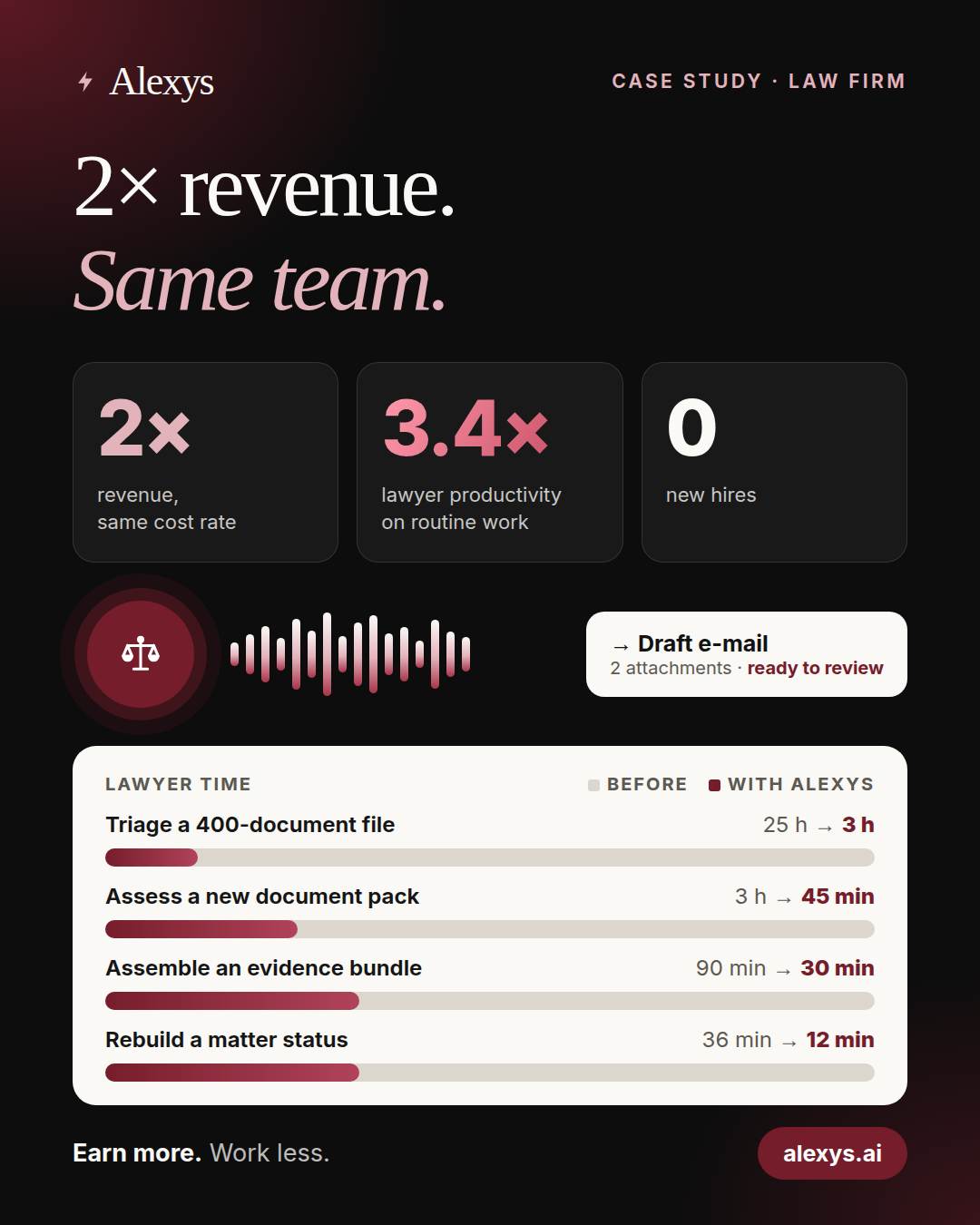
3.41× productivity and 2× revenue, without hiring. Revolead.ai brought in the clients. The workflow gave the firm the capacity to serve them. The case study shows the calculation, daily use and lawyer controls.
Talk to the managing partner. The managing partner is ready to tell you about the results.
How do you protect confidential client information?
Your firm stays in control of client information. Before using live matter data, we agree confidentiality and data-processing terms, approved providers, storage and access locations, and retention and deletion rules. We confirm which data protection rules apply to your firm and the work, including UAE federal law or the separate DIFC or ADGM regimes where applicable. We confirm provider training settings and any safeguards needed for cross-border transfers or overseas access. Your lawyers retain final review.
What do the 3.41× and 2× figures mean?
3.41× compares manual time with lawyer time for the same approved work, court correspondence included. It is a planning estimate, calculated task by task. It excludes hearings, court attendance and client meetings. 2× is the revenue growth reported by the firm, with the same team. Revolead.ai brought in the clients; the workflow gave the capacity to serve them.
Can this support mainland, DIFC or ADGM matters?
We can scope an administrative task around the relevant matter, authorised sources and your firm’s process. We agree the court-specific checklist before work starts. One court’s requirements are not treated as the rules for every UAE matter.
Does this require a direct court-system connection?
Not always. Work can start with court correspondence and documents already in your mailbox or matter folders. If direct access is needed, we confirm the permitted use and proposed connection before including it in the quote.
Can the workflow handle Arabic and English documents?
Tell us which languages and document types your firm uses. We agree the supported inputs and outputs, then test representative examples before handover. Any required legal translation or certification stays with your firm’s approved process.
Do we give you our court login?
No. The lawyer logs in personally. Alexys never receives the credentials. It reads the messages that the firm receives. Filing and sending to the court stay with the lawyer.
Who checks dates and approves communications?
The workflow extracts dates expressly stated in the documents and links them to their sources. Lawyers resolve conflicting dates, interpret requirements and calculate procedural deadlines. A lawyer approves external communications. Filing stays with the lawyer.
What do we agree before work starts?
The scope to automate, the access it needs, representative examples, acceptance cases and one all-inclusive fixed quote. Up to two change requests within the agreed need are included.
What does the Working Workflow Guarantee cover?
Each task that goes live passes the acceptance cases that we define before work starts. If it does not, we correct it at no additional fee. Reproducible defects in the accepted scope stay covered for 14 days after go-live.
Do we need IT staff to run Alexys?
No. You keep what we build. Or we run it for you. We host, monitor and update it, and we make small changes. We agree the run plan and its price before it starts. You can stop the plan at any time.
Looking for another region?
See the shared law-firm offer or the page for UK solicitors.